Real screens from Mega-Net ERP Cloud. Tap any screen to see it larger.
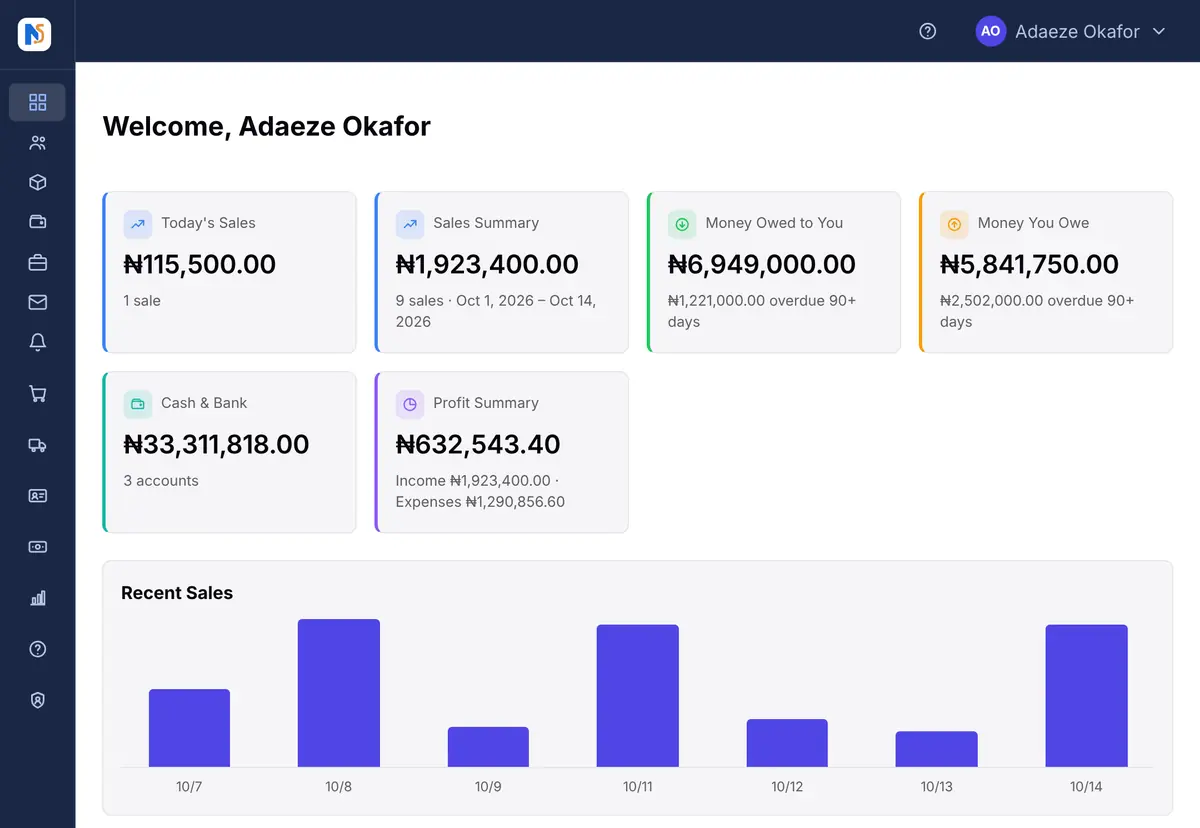
Dashboard
Know how your business is doing, at a glance.
Today’s sales, the money owed to you and the money you owe, your cash and bank balances, and profit so far, all on one screen.
Follow-ups that are due and products running low on stock show up too, so nothing waits until you go looking.
Screens show sample data from a demo company. Tap or click to enlarge.New sale
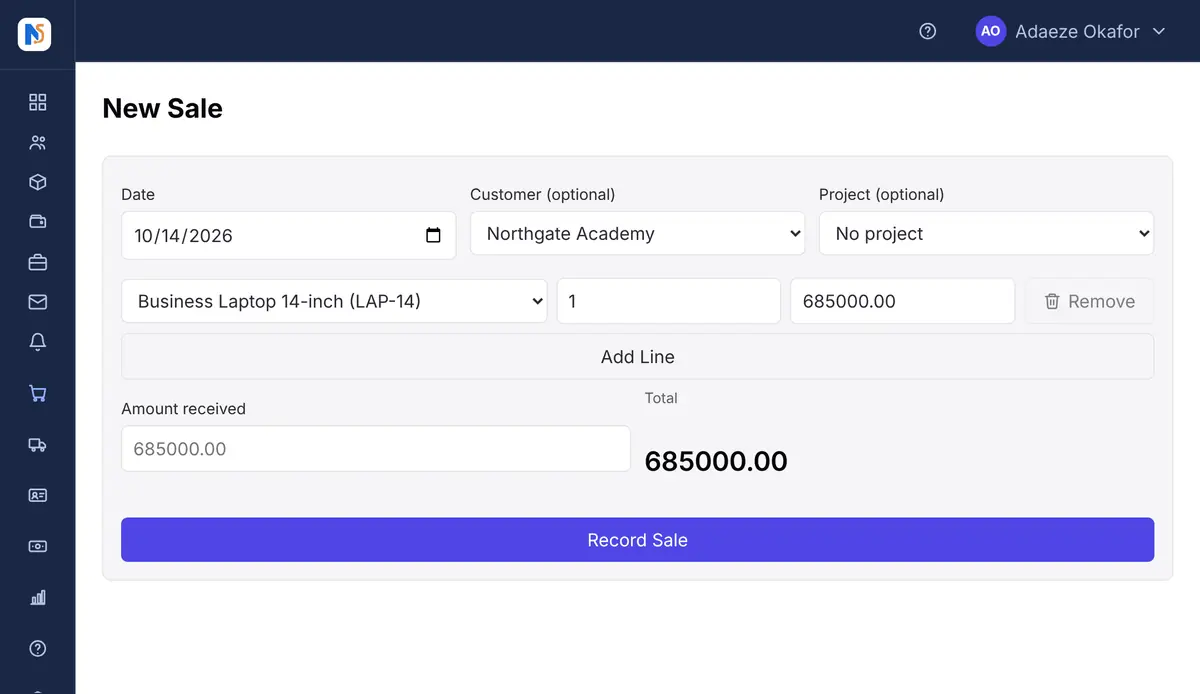
Record a sale in seconds.
Pick the customer, add the items, enter the amount received and press Record Sale.
You can tag the sale to a project as you go. The books are updated for you.
Screens show sample data from a demo company. Tap or click to enlarge.Invoice
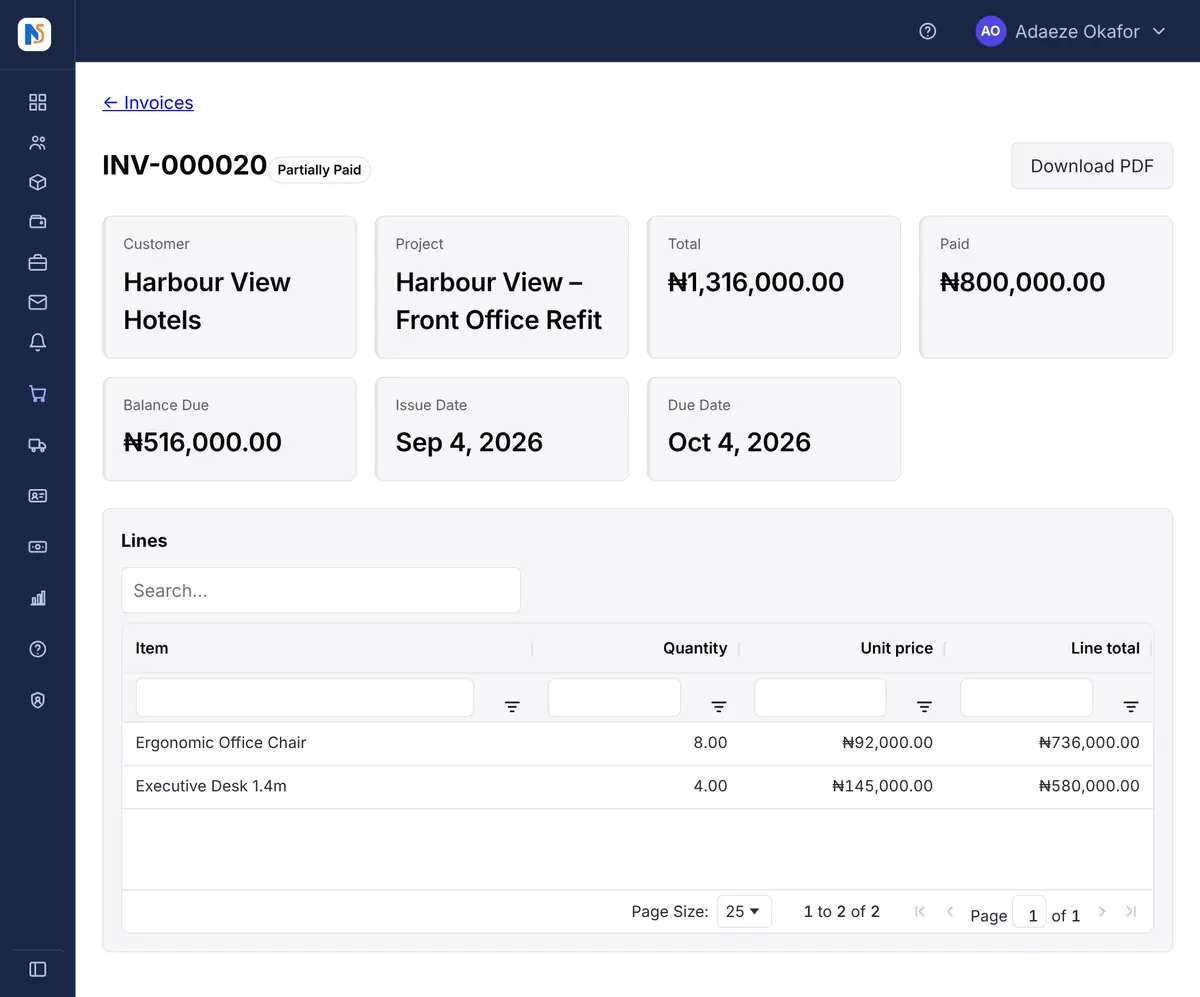
Professional invoices, ready to send.
Each invoice shows the customer, the project, the total, what has been paid and the balance still due, with the issue and due dates.
Download it as a PDF to send to your customer.
Screens show sample data from a demo company. Tap or click to enlarge.Receivables
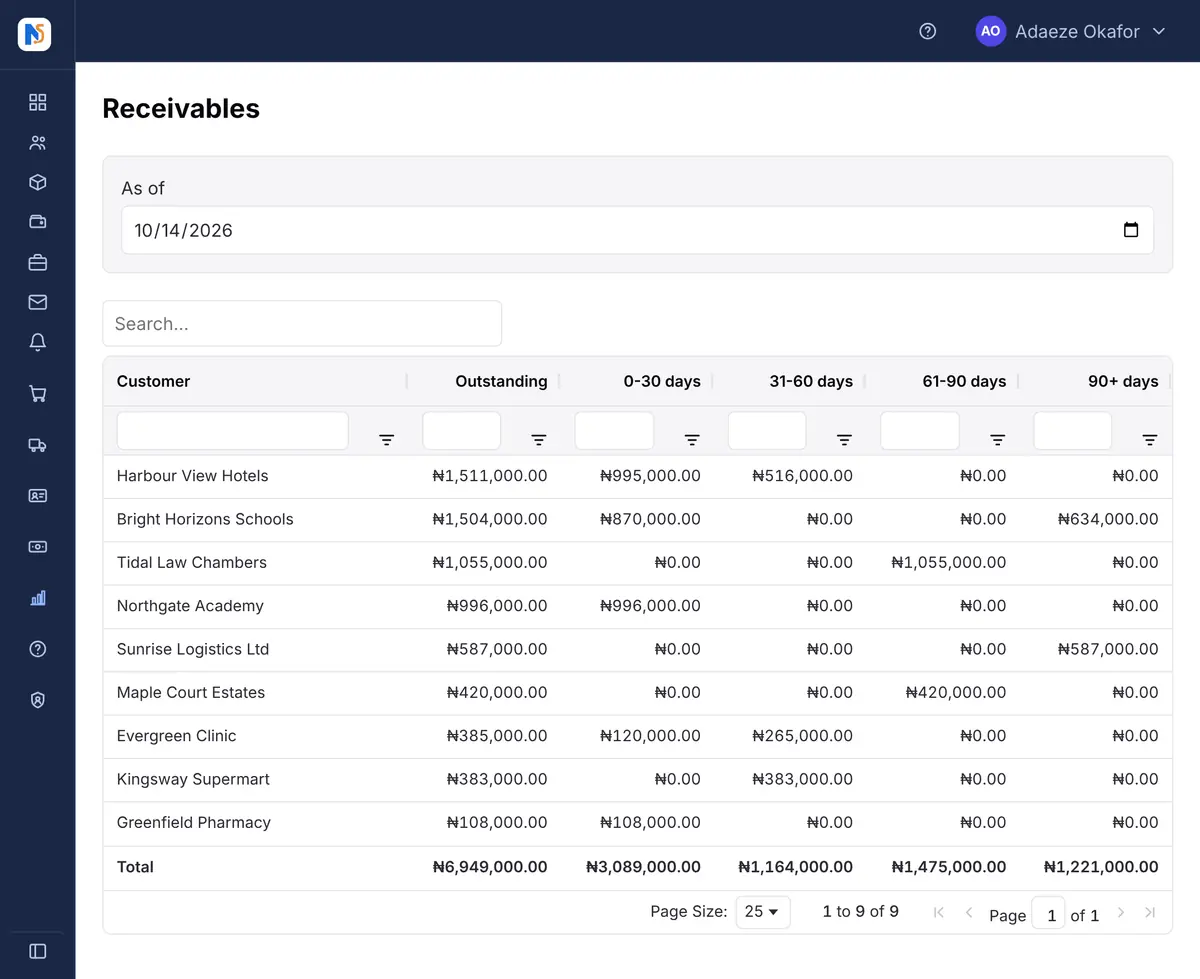
See who owes you, and for how long.
Every customer’s outstanding balance, grouped by how long it has been owed: 0 to 30 days, 31 to 60, 61 to 90 and over 90.
On a phone, the report turns into easy-to-read cards, one per customer. Payables works the same way for what you owe suppliers.
Screens show sample data from a demo company. Tap or click to enlarge.Banking and statement
Your real bank accounts, always up to date.
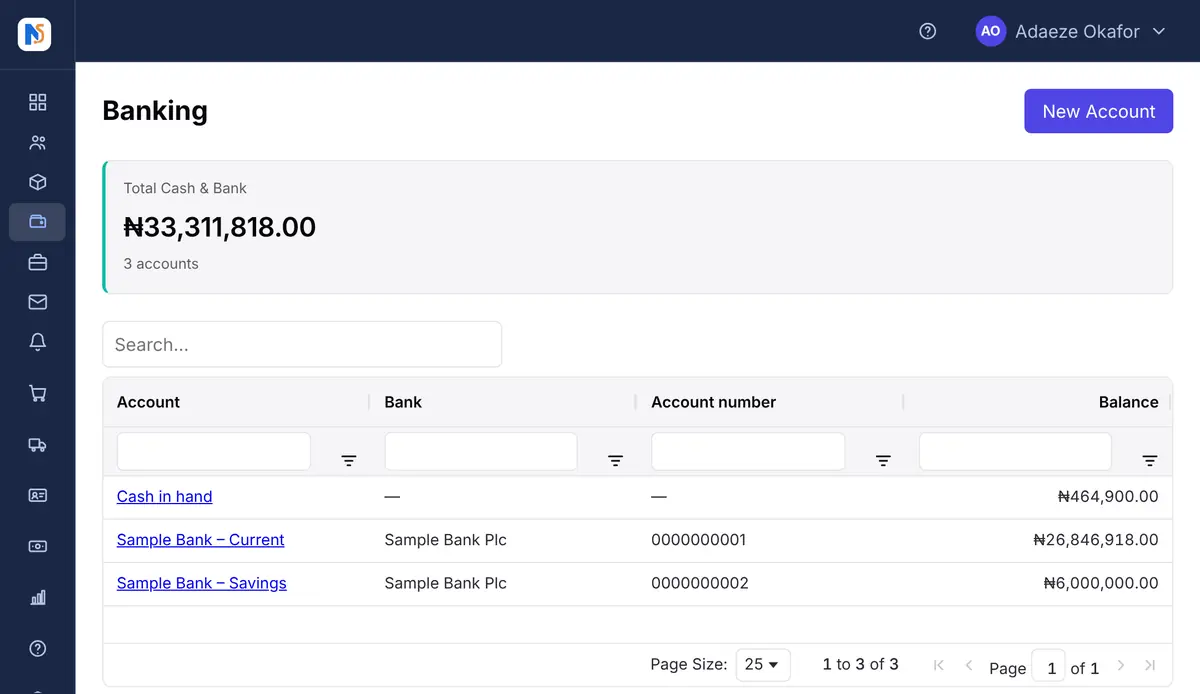
Add your bank accounts and cash in hand, enter each opening balance, and see your total cash and bank position.
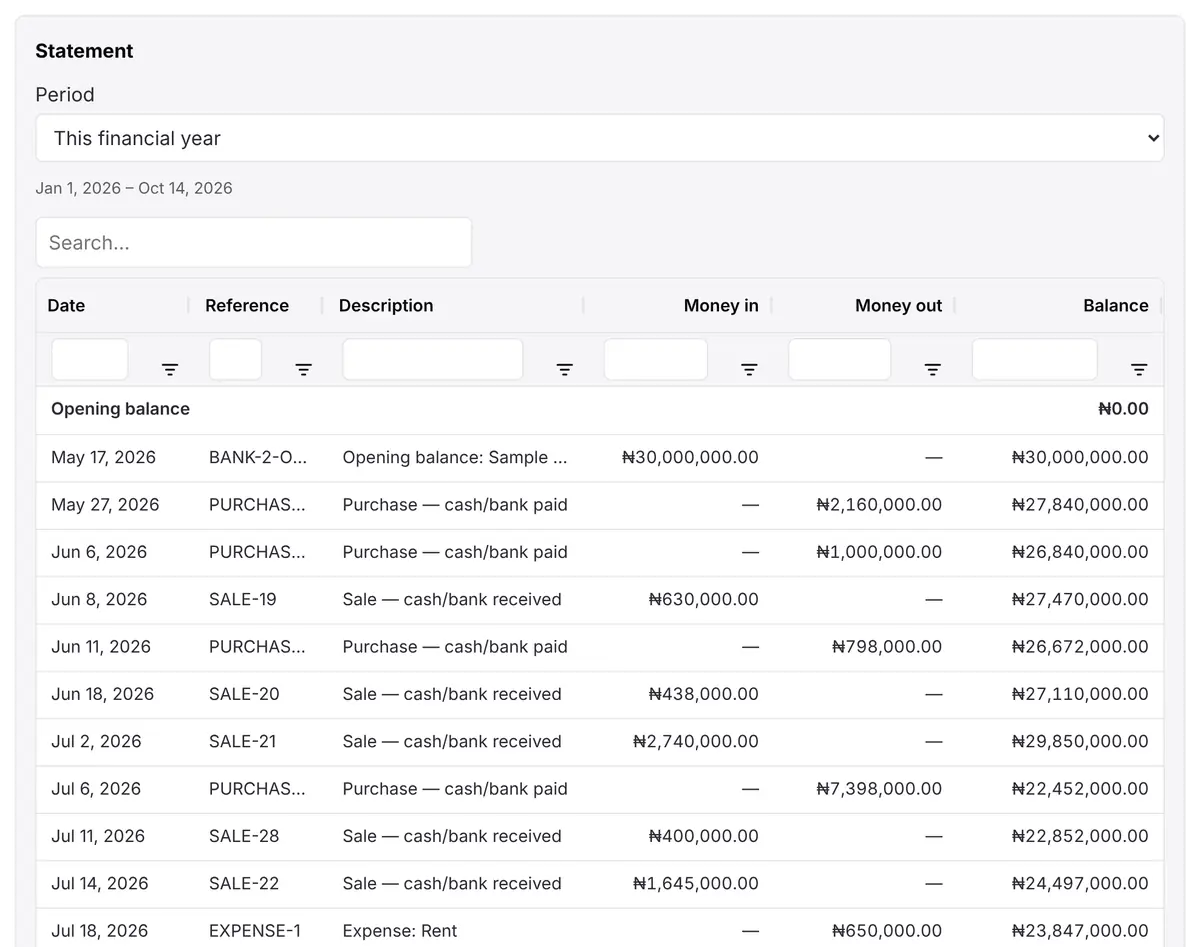
Balances move as you record sales, purchases and expenses. Each account has a statement of money in, money out and the running balance.
Screens show sample data from a demo company. Tap or click to enlarge.Screens show sample data from a demo company. Tap or click to enlarge.Profit and Loss
Are you making money? One page tells you.
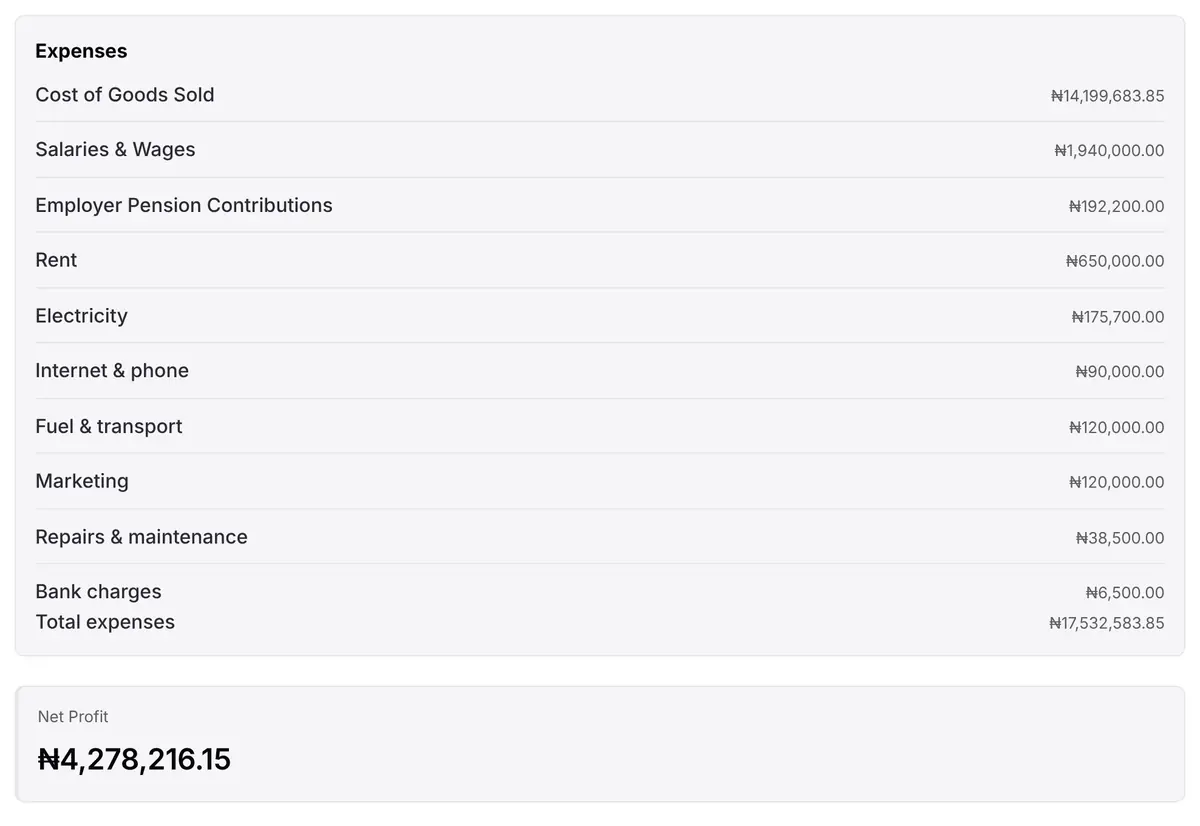
Income against expenses for the period you choose, with every expense category listed and your net profit at the bottom.
No month-end spreadsheet needed. The report is ready whenever you open it.
Screens show sample data from a demo company. Tap or click to enlarge.CRM
Never lose a lead again.
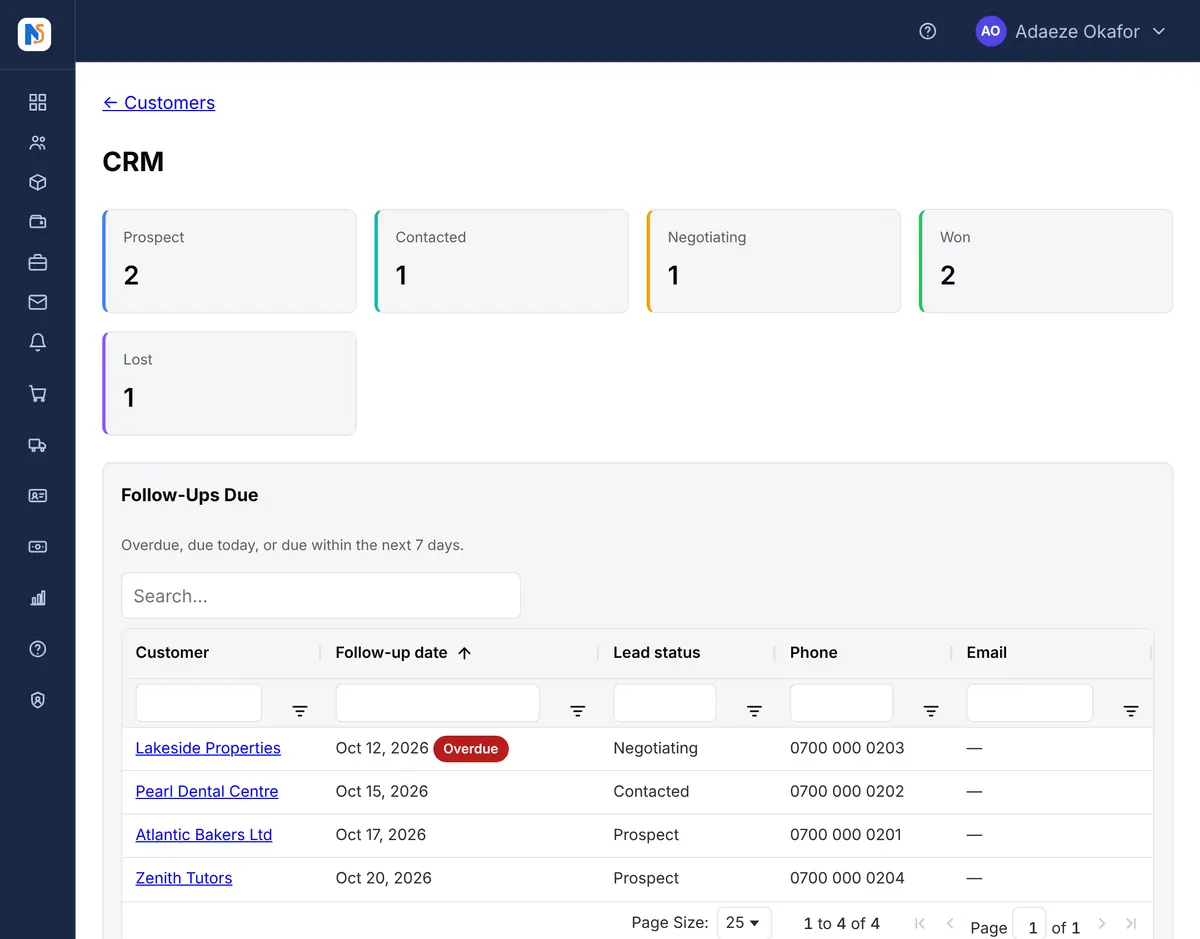
Mark customers as Prospect, Contacted, Negotiating, Won or Lost, and see how many you have at each stage.
Set a follow-up date and a Follow-Ups Due list shows who to call next, with overdue ones flagged. Keep notes on each customer.
Screens show sample data from a demo company. Tap or click to enlarge.Projects
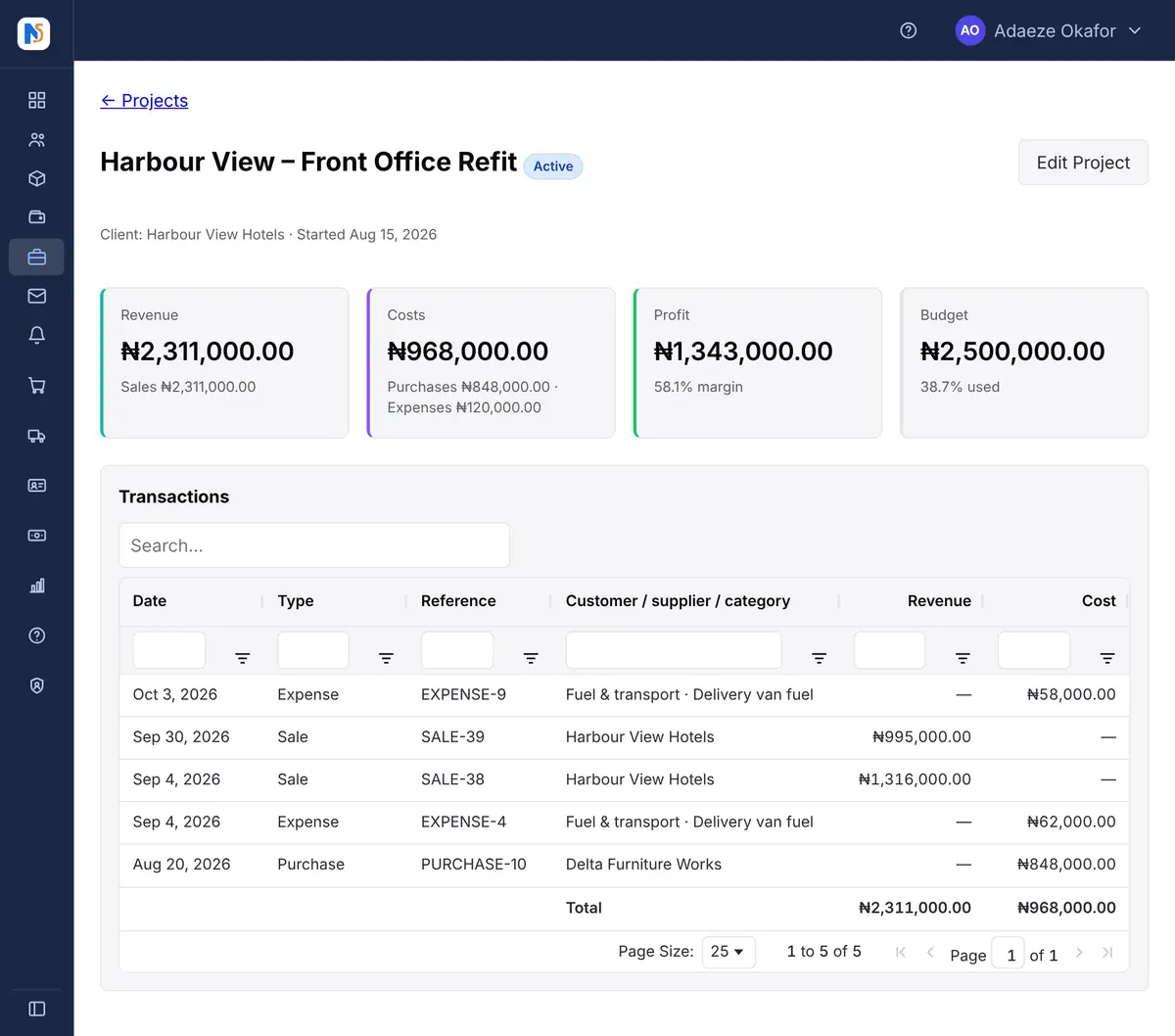
Run your projects, and see what each one earns.
Projects, tasks and milestones. Set up a project, list its tasks and mark its milestones.
Job costing by project. Tag sales, purchases and expenses to a project. Each project shows its revenue, cost, profit and how much of the budget is used.
Time tracking with approval. Staff record their time and a manager approves it. In a one-person firm, the owner can approve their own time if you switch that on.
Resource planning. Plan who is working on which project.
Project timeline. See a project laid out over time.
Screens show sample data from a demo company. Tap or click to enlarge.Announcements
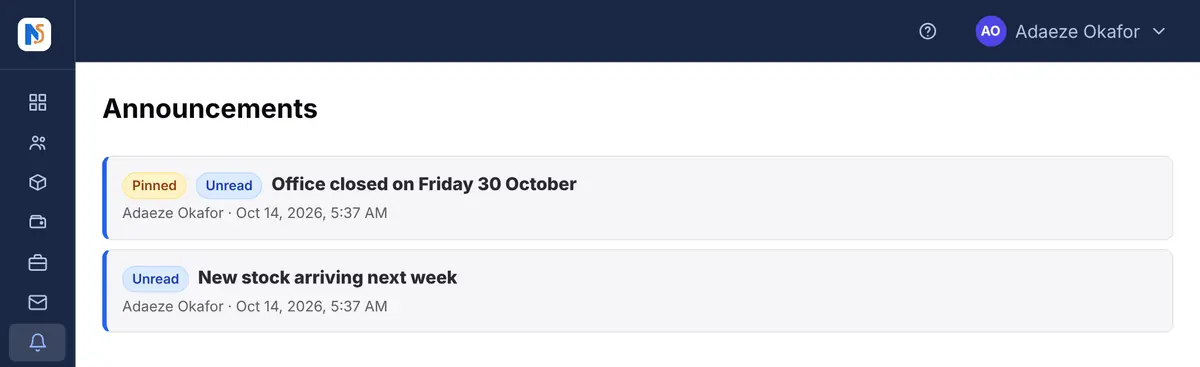
Keep your whole team informed.
Post a notice to everyone, or only to selected roles. Pin the important ones and set an expiry date.
Staff see an unread count, and you can see who has read each one. Announcements are plain text and stay inside the app. Nothing is sent by email or SMS.
Screens show sample data from a demo company. Tap or click to enlarge.HR and Payroll
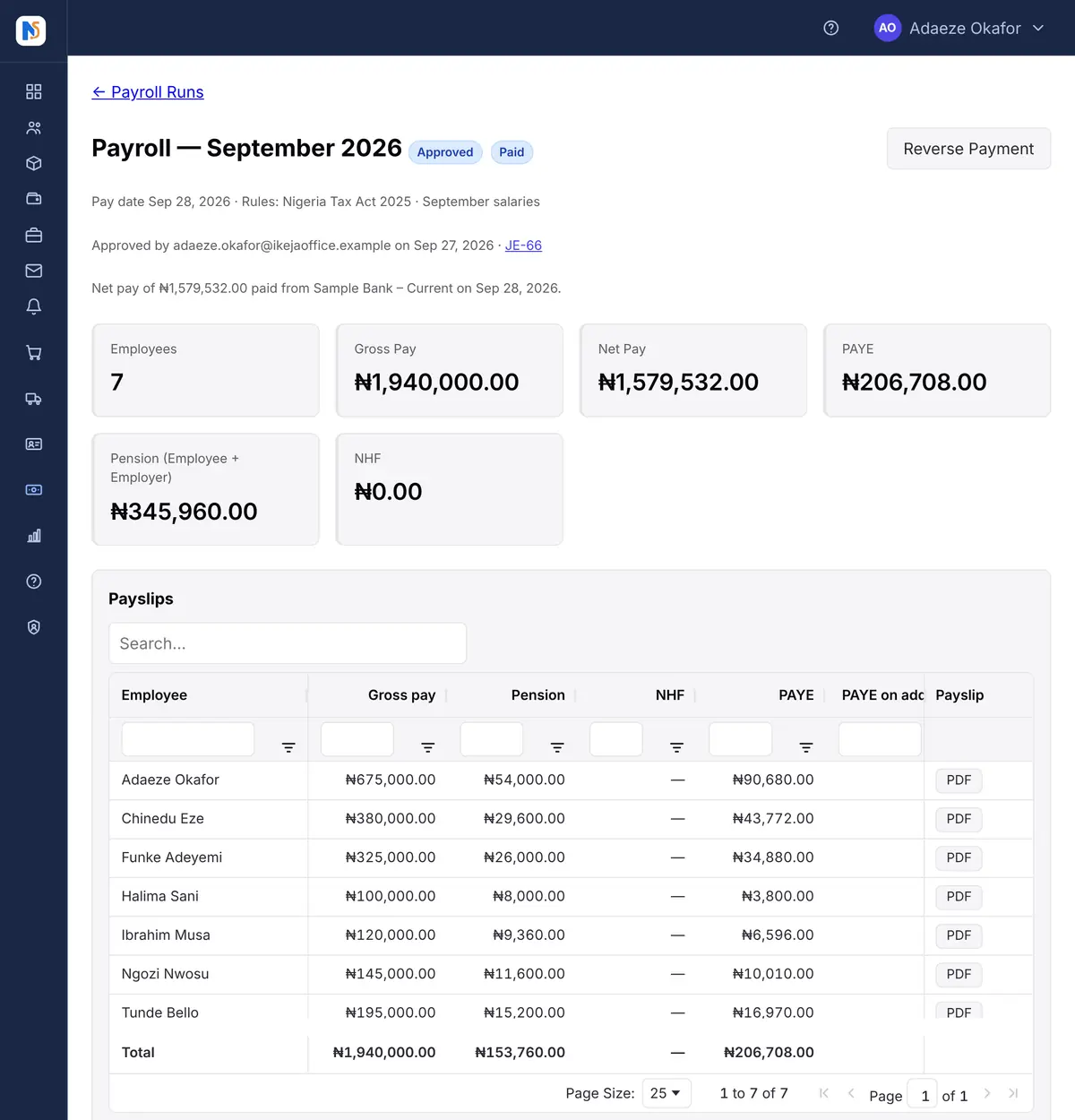
Run payroll and give staff their own payslips.
Keep employee records and leave requests, then create the month’s payroll for everyone at once. PAYE tax, pension and other deductions are worked out from rules you can adjust, and each person gets a payslip PDF.
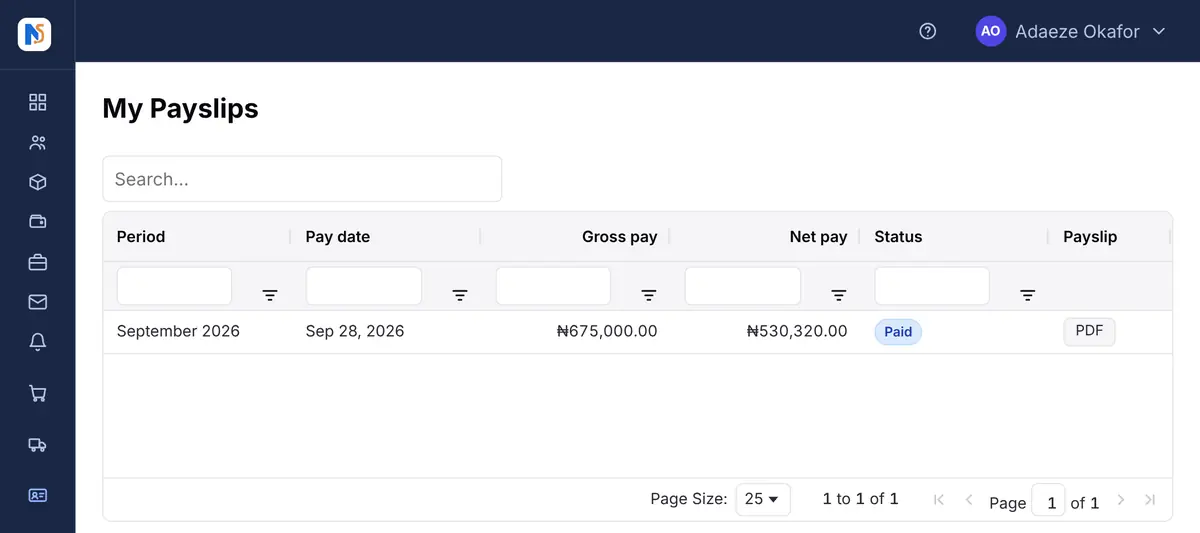
Staff can log in to see and download their own payslips. Salaries are visible only to the Owner and Admin.
The payroll rules are a starting point. Please have your accountant check them before you rely on the figures.
Screens show sample data from a demo company. Tap or click to enlarge.Screens show sample data from a demo company. Tap or click to enlarge.
What’s New
Recently added to Mega-Net ERP Cloud
Team announcementsPost notices to everyone or to chosen roles, and see who has read them.
Tighter role-based accessOnly an Owner can give out the Owner role, and nobody can change their own role. People see only the menus and records their role allows.
Phone-friendly receivables and payablesOn a phone, both reports show as simple cards instead of a wide table.
HREmployee records and leave requests with approvals.
PayrollMonthly payroll runs and payslip PDFs, including staff self-service.
CRMLead stages, follow-up dates and notes on every customer.
Coming soon: sending invoices and receipts by email.
Who It’s For
Built for growing businesses, not just accountants
Shops, pharmacies, hospitals, hotels and other small and medium businesses that want real control of their money without hiring a full accounting team.
Any small or medium business
Shops, distributors and service businesses that are ready to move off spreadsheets and paper books.
Pharmacies, hospitals and hotels
Sell products and services together in one transaction, such as a drug sale with a consultation fee, or a room with a meal.
Roles control who sees what
Each staff member signs in with a role, and only sees what that role needs. A sales assistant does not see payroll, and a purchasing clerk does not see bank balances.
Receipts recorded and reconciled against invoices automatically
Purchases & Suppliers
Supplier records and purchase history
Purchases that feed straight into stock and what you owe suppliers
Products & Services
Physical products and billable services in the same catalogThis is what makes it work for a hospital or pharmacy selling drugs and consultations together — not every ERP handles both.
Expenses
Logged, categorized, and reflected in your financials immediately
Data Import & Export
CSV exportDownload your Customers, Suppliers and Products & Services lists as CSV, ready for a spreadsheet.
CSV import, checked before anything is savedBring in Customers, Suppliers and Products & Services from a template. The whole file is validated first, and every problem is listed by row so you can fix it before importing.
Your Business Currency
Shown on every screen and documentChoose your business currency from 14 — Naira, US Dollar, Pound, Euro, Cedi, Rand and more — and every figure, invoice and payslip uses it. One currency per business.
The Accounting Engine
A full set of books, built automatically
Every sale, purchase, payment, and expense above quietly becomes a proper accounting entry underneath — a Chart of Accounts, Journal Entries, and a General Ledger, kept current without anyone manually posting a single line.
Chart of Accounts
Every account your business needs, structured and ready — no setup expertise required.
Journal Entries
Generated automatically from ordinary actions — recording a sale or paying a supplier, not a separate bookkeeping step. When an accountant needs a correction, they can post a manual entry; every entry is marked manual or automatic, and recorded in the audit trail.
General Ledger
Always up to date, always reconciled — the single source of truth behind every report the system shows you.
Financial Reports
Sixteen reports, from Profit & Loss to the payroll filing schedules — generated on demand, not compiled by hand at month-end. Every one is listed below.
All 16 reports
Financial statements
Profit & LossIncome and expenses for a period, and the bottom line.
Balance SheetWhat the business owns, owes, and is worth as of a date.
Cash FlowCash in and out for a period, and the opening/closing balance.
Trial BalanceEvery account's balance as of a date, checking that debits equal credits.
Ledger & adjustments
General LedgerDetailed transaction history and running balance per account.
Journal EntriesPost manual debit/credit adjustments to the chart of accounts, and reverse them.
Payroll filing
PAYE ScheduleEach employee's PAYE for a month's approved payroll, for filing with the tax authority.
Pension ScheduleEach employee's and the employer's pension contributions for a month, for remitting to the PFA.
Money owed
ReceivablesWhat customers currently owe, aged by how long it has been outstanding.
PayablesWhat the business currently owes suppliers, aged the same way.
Customer StatementsOne customer's sales, payments and credit notes for a period, with a running balance.
Supplier StatementsOne supplier's purchases, payments and credit notes for a period, with a running balance.
Business activity
Sales ReportTotal, count and average sale for a period, by day, week, month or customer.
Purchase ReportTotal, count and average purchase for a period, by day, week, month or supplier.
Expense ReportSpending for a period, broken down by expense category.
Inventory ReportCurrent stock levels, stock value, and what is running low.
The difference: the accounting engine runs underneath everything, automatically — you never have to open a "journal entry" screen to make it work.
AI Assistant
Ask your business a question, in plain language
"What were today's sales?" "Who owes us the most?" "Why did profit fall this month?" The AI Assistant answers from your own records, using the same reports the rest of the system runs on — and shows you the figures it used.
It only sees what the person asking is already allowed to see, it can't create or change any record, and every question is kept in the audit trail.
The Differentiator
Business Sentinel — a second pair of eyes on your books
Built-in checks that flag what's worth a second look: cash movements with no matching transaction, credit sales with no invoice or receipt, journal entries that are unusually large for your business, overdue customers who've never made a payment, and stock counts that don't match their movement history. Run a scan whenever you like; findings stay on the list until someone reviews them.
Same idea as Financial Sentinel on Mega-Net EHR Cloud, applied to general business operations instead of hospital billing.
Support
Help that's actually reachable
WhatsApp help line
A direct line to the team — no ticket queue to wait on for a quick question.
In-app help tickets
For anything that needs tracking through to a resolution.
Onboarding guide
A walkthrough for new users so the first week doesn't feel like guesswork.
See Mega-Net ERP Cloud on your own business
Tell us how you sell and we will walk you through the system live. Contact us for pricing.